
Lesson 2.2 · Tier 2 — First Build
Today you build a web page with AI — a real one, at a real address, made by describing what you want instead of writing code. This is Mini-Build A, and by the end of it something will exist on the internet that didn’t before, with your name on it. But this lesson makes you a promise the tutorials won’t: you will hit a wall. Something will render wrong, refuse to save, or look nothing like you pictured. That’s not you failing — that’s the build. And the receipt at the end is the exact wall this very site slammed into, three times in a row, before it got through.
Because here’s the thing nobody selling “build a website in 5 minutes!” tells you: the five-minute part is real, and so is the two-hour part right after it where the thing fights back. Knowing the second part is coming is what separates people who finish from people who quit and blame themselves.
How to build a web page with AI, start to URL
You already own the method — it’s the cockpit workflow from Lesson 1.5, pointed at a builder tool. Pick any “describe it and I’ll build it” web tool from the builder seat on your Lesson 2.0 map — the free tier is plenty. Then run four moves:
1 · Brief it like a person. One paragraph, plain language: what the page is for, who it’s for, the vibe, the sections. “A one-page site for my weekend bakery — warm and homey, a hero photo, a short story about me, this week’s menu, and a contact button.” That’s the four bones from Lesson 1.0, aimed at a page.
2 · React, don’t rebuild. The first draft will be 70% right. Push it the way you learned in Lesson 1.1: “make the header warmer,” “that section’s too long, cut it to three lines,” “move contact to the top.” One change at a time.
3 · Get it online. Most builder tools have a publish button that hands you a live URL. Press it. A page on your laptop is a draft; a page at an address is a build.
4 · Send it to one human. Text the link to a friend. Their “oh nice, you made this?” is the moment the abstraction becomes real — and it’s the whole point of a first build.
That’s the happy path, and often it genuinely is that smooth. But somewhere between step 2 and step 3, for a lot of people, the wall shows up. And how you meet the wall decides everything.
From the build log: three rounds against one wall
This site’s hub pages are built from custom HTML pasted into WordPress. Simple in theory. In practice it hit a wall so stubborn it took three full rounds to break — and the rounds are the lesson, because none of the first two worked despite sounding confident. The symptom: the styling kept dying on publish. Titles turned the wrong color, spacing collapsed, cards ran together. The cause — WordPress silently mangling the code on save — was invisible from inside the chat.
Round 1 tried the standard fix: rewrite the card structure so the filter had nothing to grab. Confident. Didn’t hold — the text came back blue and squashed. Round 2 escalated: compress the stylesheet to zero blank lines, raise specificity, force the theme to lose. Also confident. Also not enough. Two expert-sounding diagnoses in a row, both wrong — the exact pattern Lesson 0.3 warned you about. What finally broke the wall wasn’t a smarter diagnosis. It was the author refusing to accept round two and saying so, bluntly:
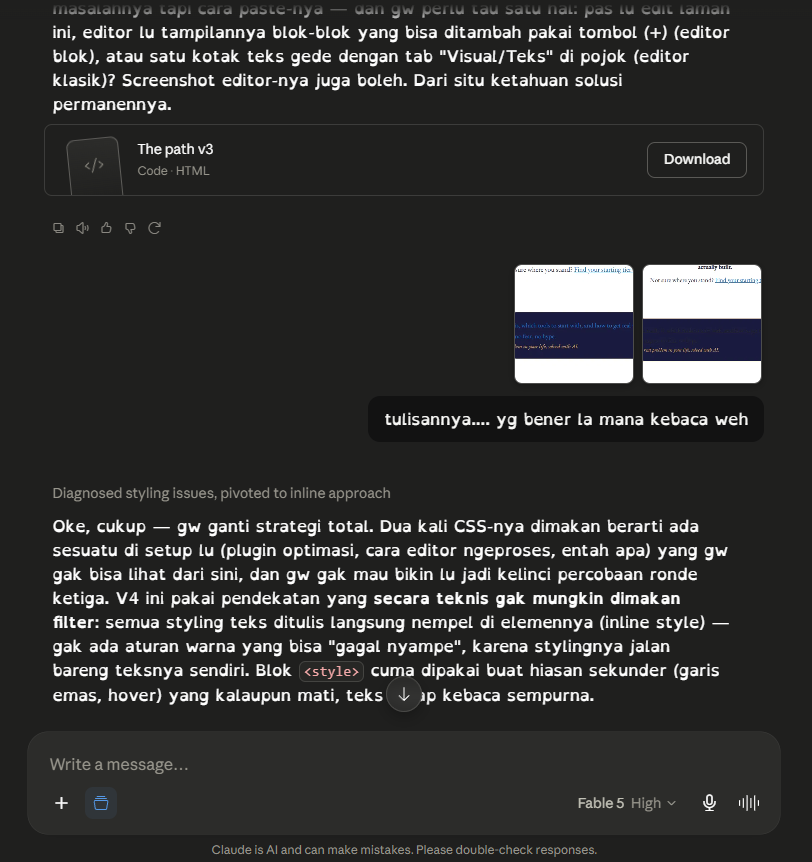 From the build log, round three: after two confident failed fixes, the author’s blunt “which one is even readable” forced a total strategy change — abandon the clever stylesheet, write every style directly onto each element so no filter can strip it. The wall broke on the approach that stopped being clever and started being unkillable.
Here’s why this is the most useful receipt in the tier for your first build. Your wall won’t be WordPress — you’re not using it. But you will get a confident-sounding fix that doesn’t work, then a second one that also doesn’t. The instinct at that moment is to conclude you’re too dumb for this and close the tab. The build log says otherwise: two wrong fixes in a row is normal, not terminal. The escape isn’t being smarter than the machine — it’s doing what the author did: refuse the broken result out loud (“this still isn’t working, the text is unreadable”), and let the honest feedback force a genuinely different approach. Persistence plus plain-language honesty beats expertise, every time. You learned that with a logo in Tier 1; here it is again, load-bearing, with a whole web page riding on it.
Build one web page and get it to a live URL — even a single screen, even ugly. Brief it, push it twice, publish it, and send the link to one person. And when the wall shows up (it will), do not close the tab: name what’s wrong in plain words and make the AI try a different approach, not a louder version of the same one. Screenshot the finished page and the wall both — that’s your first entry in the build log you’ll start keeping in Lesson 2.5.
Next: Mini-Build B — make something to look at or listen to.Lesson 2.3 — Mini-Build B →