
Lesson 2.0 · Tier 2 — First Build
Every builder needs an AI tool map, and almost everyone draws the wrong kind: a list of tools. Lists rot — the hot tool of this month is the abandoned tab of the next, and “10 AI tools you MUST try” is an industry built on making you feel behind. Here’s the map that doesn’t rot, the one this entire site was built on: map the categories, then make exactly one pick per category — and stop.
This matters more in Tier 2 than anywhere else, because tool-hopping is the number one way first builds die. Not from lack of skill — from restarting. Every switch throws away something you learned in Lesson 1.3 to treat as an asset: accumulated fluency. Your tenth hour inside one tool is worth more than your first hour inside ten.
The AI tool map: categories, not tools
For the three mini-builds ahead, you need at most five seats filled. 1 · The cockpit — one text AI where you think, plan, and engineer prompts for everything else (you built this habit in Tier 1; whichever chat holds your prompt library is your cockpit). 2 · Image generation. 3 · One more media seat — video or music/voice, only if your Mini-Build B needs it. 4 · A builder — the tool that turns descriptions into a working web page (Mini-Build A). 5 · A publish platform — where finished things live at a real URL. That’s the whole map. Notice what’s not on it: no “AI productivity suite,” no automation platforms, no agents. Those are real categories — for later tiers. A map for a first build that includes everything is a map of nothing.
How to make each pick, in order of honesty: does its free tier survive one mini-build; will you actually open it tomorrow; are there enough humans using it that your beginner question is already answered somewhere. That’s it. Benchmarks, launch threads, and comparison videos optimize for demos; your build needs Tuesday-morning reliability. And one rule that outperforms all research: no switching until all three mini-builds are done. A mediocre tool you know beats a brilliant tool you’re perpetually restarting in.
From the build log: the five picks that built this site
Here is this website’s entire tool map — five seats, filled once, never switched mid-build:
Cockpit — Claude. Every lesson, every debate, every prompt you’ve seen in the receipts lives in one project there.
Image — Higgsfield. The whole mascot journey, from 1:1 book renders to the 21:9 genie.
Publish — WordPress + GeneratePress theme. Maximum control for a site meant to last years, accepting a steeper learning curve (a war story you’ll meet in Mini-Build A).
SEO — Rank Math. Used with a discipline you’ll learn later this tier: target a 65–75 score and permanently ignore half its suggestions.
Domain — a registrar and a $12-class name, after declining a $5,100 premium .com — the debate you watched the AI lose in Lesson 1.2.
Every receipt on this site — all fifteen-plus lessons of them — came out of just these five seats.
And here’s the moment a seat actually got filled — worth studying because of how boring the criteria were. Mid-build, the logo needed 3D renders. Instead of a research detour through every image tool on the market, the question asked was: what’s already connected and can do the job end-to-end? The registry search came back, the answer was “the tool you already have,” and the entire selection process concluded in one word:
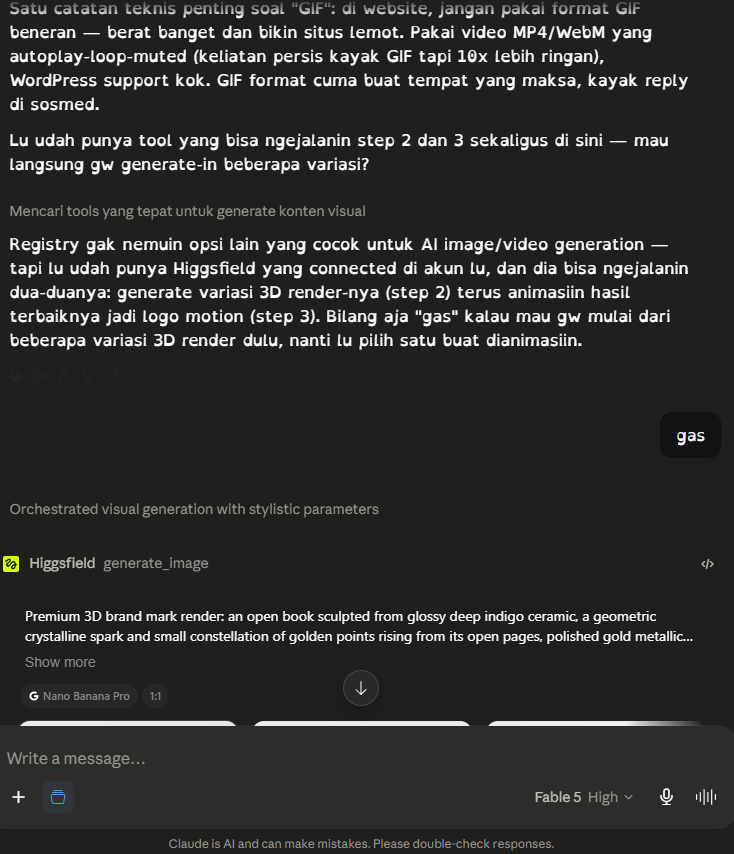
From the build log: a tool decision in real time. The registry checked for alternatives, found nothing better connected, and the author’s entire evaluation process was one word: “gas” — go. The renders started thirty seconds later. No comparison video was harmed in the making of this logo.
Count the FOMO resisted: this site was built during months when new AI tools launched weekly, and its map never changed. Not because the picks were perfect — the build log records real frustrations with every one of them — but because a stable map turns every frustration into fluency instead of a reason to restart. The wpautop war, the credits outage, the Rank Math score discipline: all of it became lessons precisely because the tools stayed put long enough to be understood.
Draw your map in your notes app — five lines, five seats: cockpit, image, extra media (only if needed), builder, publish. Fill each seat with one pick using the three honest criteria, write today’s date, and add the pledge: “No switching until all three mini-builds are done.” That one page is your Tier 2 foundation — and if a seat is hard to fill because of money, that’s exactly what the next lesson settles.
Next: what free actually gets you — with this site’s real invoices as evidence.Lesson 2.1 — Budget Reality Check →